MapView™ - See Your Entire Operation - At a Glance

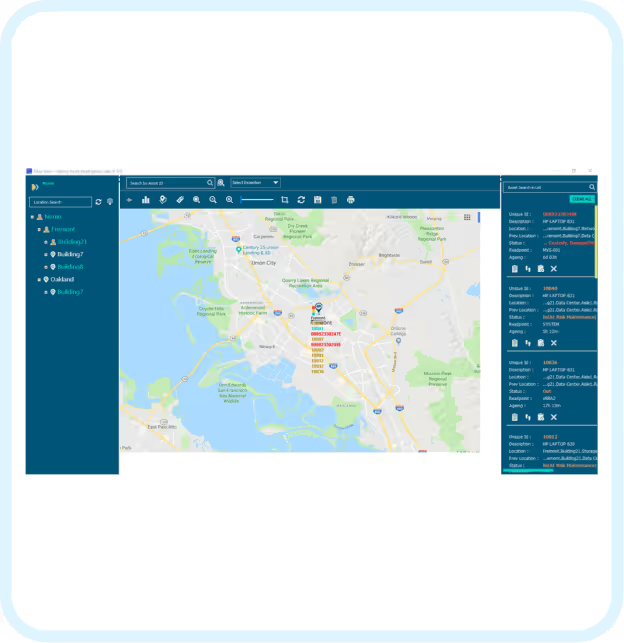
MapView™ turns your facility blueprints into a live operations-floor digital twin. Upload your floor plans and instantly see where every asset and job is — from a global multi-site view down to a specific shelf or workstation. Spot exceptions visually. Find anything in seconds. Act like you are standing right there on your shop-floor.

Book a Demo
Technology

MapView™ - See Your Entire Operation - At a Glance

MapView™ turns your facility blueprints into a live operations-floor digital twin. Upload your floor plans and instantly see where every asset and job is — from a global multi-site view down to a specific shelf or workstation. Spot exceptions visually. Find anything in seconds. Act like you are standing right there on your shop-floor.

What you can do with MapView™:

  • See your whole operation on one screen — Navigate across sites, buildings, and floors on your actual blueprints and production lines
  • Find any asset instantly — Search by attribute or status and MapView highlights every match on the map
  • Spot problems before they escalate — Exceptions appear visually so nothing gets missed in a list
  • Create tasks on the spot — Assign work to floor staff directly from the map, no separate system needed
TaaS-MapView interface displaying geographic asset tracking with site navigation and real-time job workflow monitoring
Benefits

Map your World, Visually

Visual drag & drop of locations at the region, building & shop-floor level

Efficient Tracking

In-building tracking of assets and workflows by sub-location and status

Test Before You Invest

Reduce risks, costs & accelerate proof-of-concepts for complex IoT deployments

Global View, Granular Control

View assets by sub-location across multi-site deployments on their respective maps

Visual Diagnostics, Real-Time Solutions

Troubleshoot services leveraging EdgeView™ device monitoring and view exceptions visually in MapView™

Map visualization icon for location-level asset tracking
Map your World, Visually
Visual drag & drop of locations at the region, building & shop-floor level
Efficient tracking icon for workflow and sub-location monitoring
Efficient Tracking
In-building tracking of assets and workflows by sub-location and status
Visual diagnostics icon for real-time operational monitoring
Test Before You Invest
Reduce risks, costs & accelerate proof-of-concepts for complex IoT deployments
Global view icon for multi-site asset management control
Global View, Granular Control
View assets by
sub-location across multi-site deployments on their respective maps
Visual diagnostics icon for real-time service troubleshooting
Visual Diagnostics, Real-Time Solutions
Troubleshoot services leveraging EdgeView™ device monitoring and view exceptions visually in MapView™

What you can do with MapView™

01
See your whole operation on one screen

Navigate across sites, buildings, and floors on your actual blueprints and production lines

02
Find any asset instantly

Search by attribute or status and MapView highlights every match on the map

03
Spot problems before they escalate

Exceptions appear visually so nothing gets missed in a list.

04
Create tasks on the spot

Assign work to floor staff directly from the map, no separate system needed.

Frequently Asked Questions

Yes. Import your floor blueprints and MapView plots every asset in real time — from geographic locations down to rooms and shelves.

Yes. Search by any attribute or status and MapView highlights all matching assets on the map, with a detail list on the side. Click any location to open that floor plan.

Yes. Find the assets you need to act on, then create tasks for floor staff to complete — all without leaving the map view.

Frequently Asked Questions

Can MapView show the physical location of assets?
FAQ ArrowFAQ Arrow
Can you create tasks from MapView?
FAQ ArrowFAQ Arrow
Can you search for assets in MapView?
FAQ ArrowFAQ Arrow